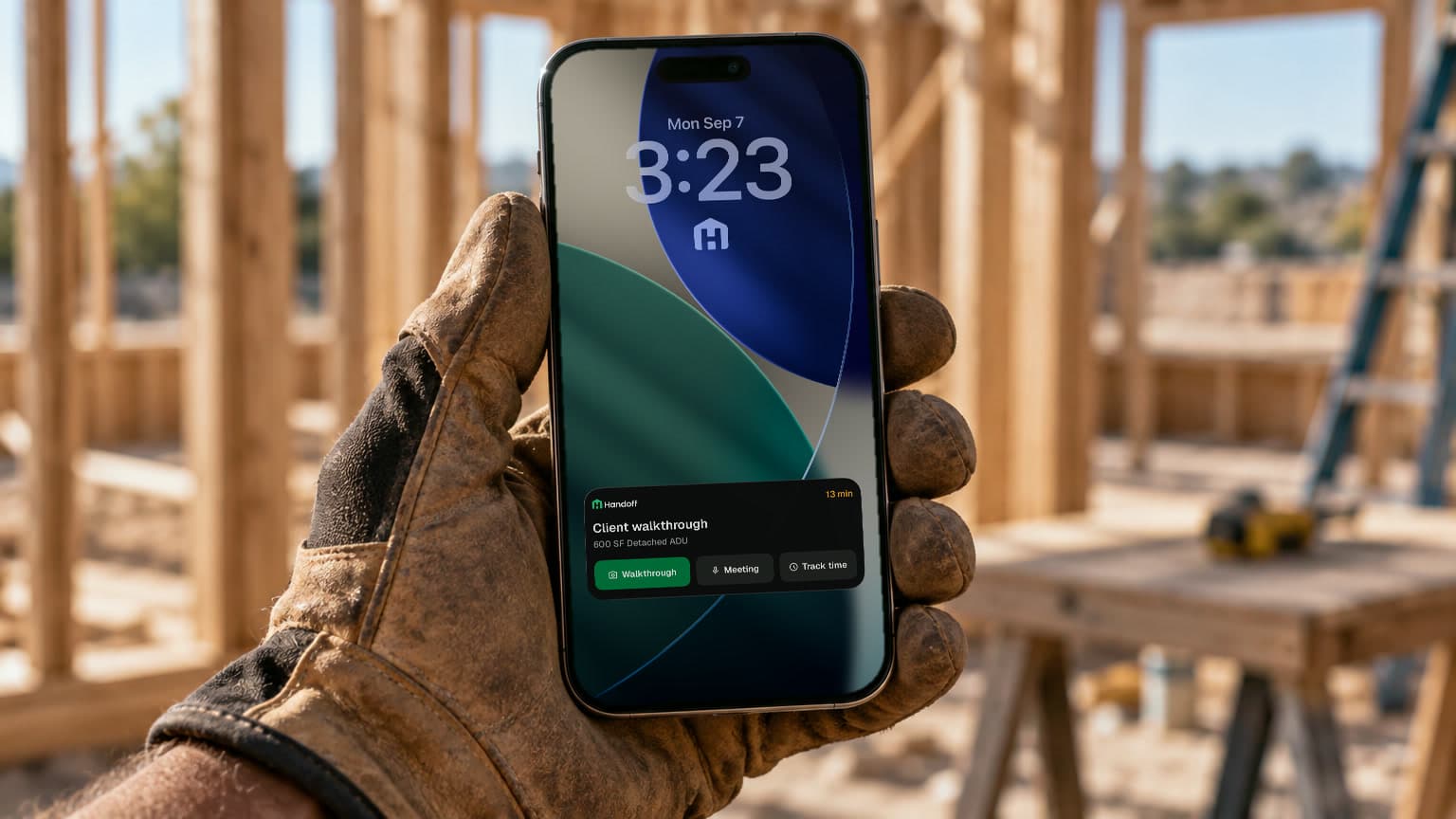
This one was mine start to finish. I had never built a widget or a Live Activity, and I wanted to. Building is the part of the job I enjoy most, and this one looked both fun and useful. I pitched it on August 24, designed it in Paper that week, built it in our Expo app, ran the rollout and fixed what came back.
Four to six taps is too many on a job site
Contractors use Handoff in the field, between site visits, often with a client standing next to them. More than half of our daily active users are in the mobile app, and about 7 in 10 of those are on iOS.
To record a meeting or start a walkthrough, they had to find the app, open it, find the project and then find the feature. That's four to six taps while the client waits. iOS already has a way around this: widgets, a menu on the app icon and Live Activities. Granola shows a Live Activity while it records a meeting, and Handoff records meetings too, so the idea fit.
- 1Find the app
- 2Open it
- 3Projects
- 4Find the project
- 5Find the feature
- 1Tap an action on the widget
- 2Pick the project
The widget knows who you are, not which job you're on, so it still asks for the project. A row on the Schedule widget already knows, so it goes straight in.
Four days in Paper first
I didn't go straight to code. Over four days in Paper I tried colorways, layouts and states for every surface, and threw most of them away.
Widgets and quick actions
Each part does one job, and every one is a link into the app. A button on a widget runs in the background and can't open the app, so links were the only way to land people on the right screen.
- Schedule widgetWhat's next, with a countdown that ticks on its own, and the rest of today below it. Each row opens that item.
- Quick actionsPress and hold the app icon for the same actions, filtered to what your plan includes. I use these menus in other apps all the time, so Handoff got one.
- Small widgetsTwo versions of the same square: a grid of four actions, or two rows with targets big enough to hit in gloves. Press and hold either one to choose its actions.

Live Activities and the Lock Screen launcher
On the Lock Screen, the Handoff mark under the clock opens the app. When you clock in or start recording a meeting, a Live Activity keeps the timer there, so you can put the phone in your pocket and still see it running.
 in 13 minClient walkthrough600 SF Detached ADUWalkthroughMeetingTrack time
Starting soon
- Tracking time600 SF Detached ADU2:14:38Stop
Tracking time
- Recording600 SF Detached ADU6:12Stop
Recording
Built in the real app, shipped in 24 days
I built it in the real app, not a prototype. Expo's widget tools write SwiftUI from TypeScript, so the widgets are native without a separate Swift project. Mobile engineering reviewed every pull request. I ran it on my own phone well before anyone else had it, then rolled it out in stages: internal testers, 25%, 50%, and everyone on September 17.
Real use found four problems the simulator didn't, like a timer that filled the Dynamic Island on some phones. I fixed each one within a day or two.