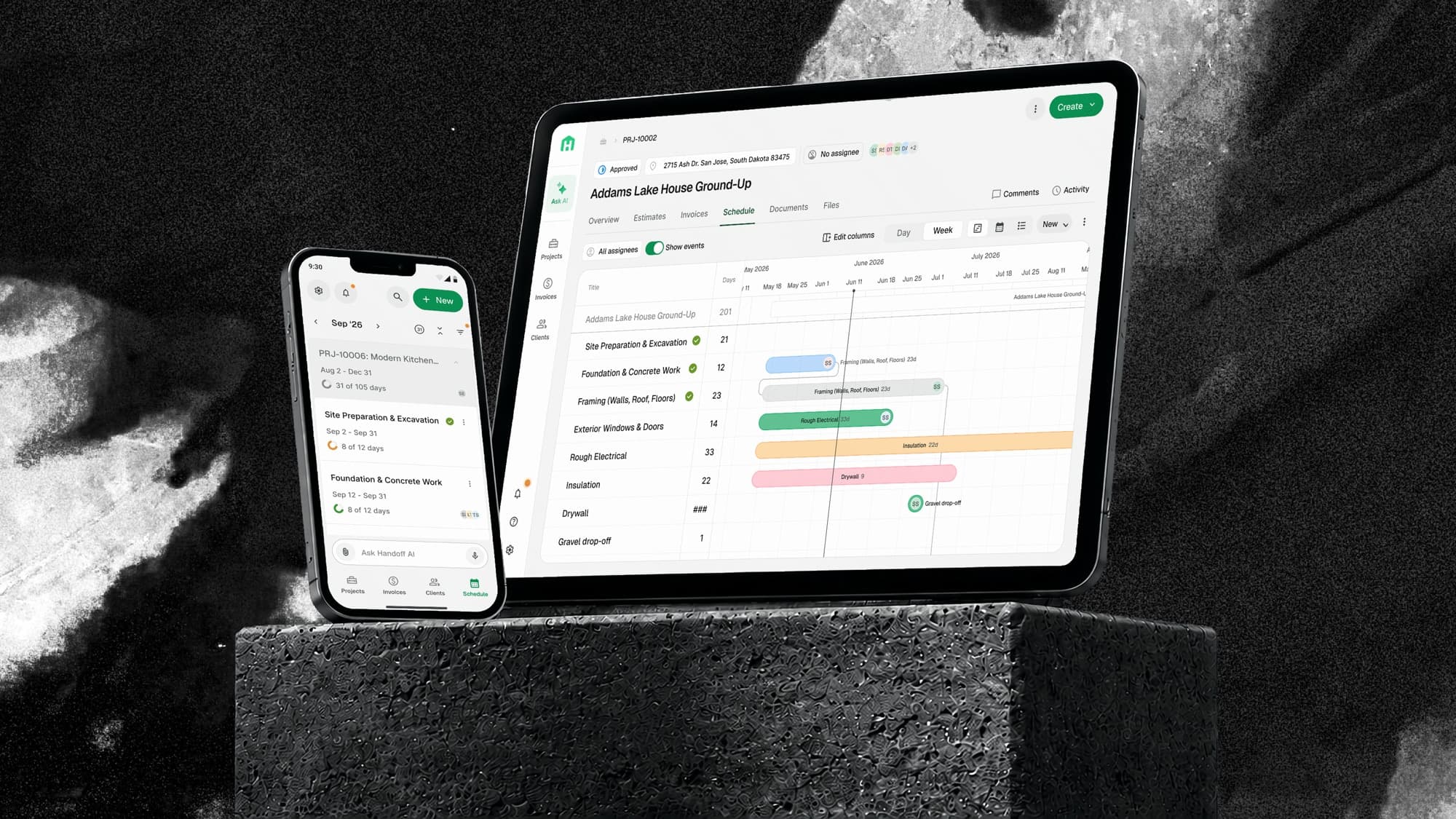
The gap
Handoff took contractors from lead to estimate to proposal to invoice. The day work started, everything moved to calendars, spreadsheets, and group texts.
The company needed existing customers to keep finding enough value to stay and grow. Estimating was a sharp wedge for getting contractors in the door, but it did not hold them through the rest of the job. Scheduling was the most requested feature in the product.
Team and timeline
Three people and twelve weeks. One designer, one product manager, one engineer, with six weeks of product definition and design before six weeks of engineering. I owned design end to end, from discovery through rollout, and pushed for a technical spike on the calendar and Gantt libraries before we committed to a direction so we were not designing interactions that could not be built.
Where the job fell apart
We mapped what happened once an estimate was accepted. The front of the workflow was connected. The moment execution began, both the workflow and the toolset fractured.
- Lead
- Estimate
- Proposal
- Invoice
Structure the contractor had already built in the estimate got retyped by hand into every one of these. No shared source of truth, and all the coordination overhead landed on one person. Some customers left for a product that covered more of the job. Others cut us when they trimmed their software budget.
Getting grounded
We already knew customers wanted scheduling, so discovery was not about proving demand. It was about learning what kind of scheduling product contractors actually needed. Four sources of evidence let us compare what they said, what they asked for, and what they did.
Deep rather than broad. Each one walked us through a live job: how they sequenced it, who they had to call, what changed that week. This is where the language came from, and the survey is what told us how far it generalized.
Mostly owners, most running one to five jobs at a time. Enough to check whether what we heard in a handful of interviews was actually common.
What customers had already asked us for, read next to what they were doing in the product. Stated demand against observed behavior.
The one source that was not our own customers talking. A check on whether our instincts matched what the category and everyday tools had already settled.
The interviews gave us the language. The survey told us how much of it generalized.
What do you use for project management or scheduling today?
58 of 60 answered · multiple selections allowed
We were not taking share from a competitor. We were replacing a calendar, a spreadsheet, and nothing at all, which set the bar: it had to beat a Google Calendar someone already knows how to use.
- Calendar only25
- Spreadsheets22
- No dedicated tool19
- Other8
- Houzz Pro3
- Buildertrend2
- JobTread2
Benchmarks were the counterweight to both. Contractors judge a scheduling tool against the construction software they have already tried, and against the calendar already on their phone.
The construction tools contractors had already tried, and the parts of them they complained about. Useful for knowing the baseline, not for deciding what to copy.
How scheduling, timelines, and date entry get solved outside our category. Mobbin for the pattern library, everyday calendars for the habits nobody has to be taught.
Read together, the four sources pointed the same direction, and away from the calendar we had assumed we were building.
- 01InterviewsProduct data
The estimate is already the plan.
Contractors had defined every phase and cost to win the job. The schedule could inherit that structure instead of asking them to build it a second time. This is the one we walked in expecting, and discovery confirmed it rather than revealed it. That still mattered: it meant we could hang the entry point on it without hedging.
Led toStart from the estimate
- 02Interviews
Schedules are living plans, not documents.
Contractors checked them constantly and changed them almost as often. Flexibility and fast editing mattered more than precision at the moment of creation, which meant the system had to be good at absorbing a change and showing what it cost.
- 03InterviewsBenchmarks
One schedule needs more than one view.
Calendar for the week ahead, Gantt for sequencing and parallel work, a table for people who wanted to scan it like paper. One contractor drew the Gantt view in an interview without knowing the word for it.
- 04SurveyInterviews
These users are builders first.
Software is not their job. Forty-nine of the fifty-nine people who gave us a role were the owner, not a project manager or a coordinator. The field experience had to stay glanceable and easy to update with one hand, standing on a job site.
Led toBuilt for the field
- 05InterviewsSurvey
The real job is coordination.
Scheduling was never about documenting dates. It was about sequencing people, trades, and changes across a project that moves every week, and almost every change had somewhere else in Handoff it needed to reach.
Led toIt was never one screen
Not a calendar. A coordination system built on data the contractor had already created.
The reframe the rest of the project rested on
It was never one screen
Almost every action on a schedule changed what happened somewhere else in Handoff. Mapping those connections before we designed anything is what turned this from a calendar feature into a system-level product, and it is the reason a three-person team spent six weeks on definition. Each surface below arrived as a question, and the rest of this page is largely the answers.
- NotificationsWho hears about which change, and when?
- Activity feedWhich schedule actions belong in the project record?
- PermissionsWho can view, edit, or manage the schedule?
- Client portalWhat is appropriate to show the homeowner?
- SearchHow should schedule content surface and be found?
- Global calendarHow do schedules across every project aggregate?
- AI chatWhich actions can the agent take without confirmation?
One rule fell out of that map and settled most of it: a project has exactly one active schedule. Anything else would leave every surface above guessing which plan to trust, and a notification, an activity entry, or a client-facing view pointing at the wrong plan is worse than one pointing at nothing. It is also why regenerating replaces the schedule instead of adding a second one, and why the agent has to say what it is about to overwrite before it does.
Start from the estimate
Contractors had already defined every phase of the job in the estimate. Demolition, framing, rough MEP, finishes. The schedule inherits that structure instead of asking them to build it a second time, and the entry point sits on the estimate itself.
AI writes the first draft
The agent asks for a start date and a scope, then generates phases, durations, and sequencing.
About 67 percent of generated schedules were edited afterward. That looks like a two-thirds error rate until you look at what changed: 65 percent of those edits moved a start date, which is rescheduling rather than correction. AI supplies the structure. The contractor supplies the judgment.
Designing how the agent behaves
Handoff is an AI-first product, so the convention was simple: anything a user can do through the interface, the agent should be able to do too. That made the data model a dependency for the AI experience. We had to define what a schedule contained before we could define what the agent could touch.
The behavior spec, rendered in Handoff's components rather than captured from a live session.
The agent can spot parallel work, but it does not know which crews can actually be in two places. It proposes; the contractor decides.
Confirmation requiredI wrote a behavior spec for every one of these: the user's intent, the expected reasoning, the product action, the response, and whether it required confirmation. The pattern that fell out is the one above. Reads run immediately, additive changes run and report what they did, and anything destructive or wide-reaching states its blast radius and waits.
We evaluated output two ways. The team built a golden set of ten reference schedules from real estimates and compared generated phases, durations, and sequencing against them. In-product feedback and a survey caught the rest. The golden set tested construction logic. Users told us whether the result was useful.
What we cut
Scoping a first release is mostly deciding what not to build. This was the first of three calls that shaped it, and the one that cost us the most.
01. Collapse three object types into one flexible schedule item, and defer tasks entirely.
- Why
- Ten phases with ten tasks each is a hundred generated rows for someone to read and correct, and errors compound as the count grows. Phases and events shared nearly every field, so keeping them separate would have added interface, data, and AI complexity without earning it. I made the call to fold them into one type and hold tasks for a later release.
- Tradeoff
- Tasks were a real user need and I shipped without them. I took that in exchange for validating the scheduling foundation first, with AI output small enough that a contractor would actually check it.
- PhaseTaskCut from v1TaskTask
- Event
- Schedule item
- Schedule item
- Schedule item
- Schedule item
One object carrying a title, a date or time range, an assignee, and a location. How it is configured decides whether it renders as a bar across days or a point in time.
Reorder the stack by dragging a node, or with the arrow keys
One schedule, three views
The second call went the other way, and added scope rather than cutting it. The cheap version of this is picking the best view and letting everyone else adapt, and discovery had already told us that would leave people behind.
02. Build Gantt, calendar, and table as three views of a single underlying schedule.
- Why
- Research turned up three genuinely different mental models, and users asked for the plain table late in the process. Assuming the most sophisticated view worked for everyone would have left people behind, so I took the added scope into an already large release rather than pick one and make the rest adapt.
- Tradeoff
- Three representations of the same data is three times the surface to design, build, and keep consistent. I held that cost down by building the list view on the estimate table pattern we already had.
Built for the field
Mobile is not the desktop calendar squeezed down. It is its own experience, built around one or five days depending on how far ahead you need to look.
Dates change through a picker rather than a pair of arrows, the view switch lives in a bottom sheet, and every item opens into one editor sized for a thumb.
That editor is where the single item model pays off. One sheet, and a toggle at the top that decides whether the thing you are creating is a phase or an event.
Predictable over clever
The last call was the smallest and the one I would defend hardest. A schedule that reorganizes itself is tidier on paper and disorienting in the hand.
03. Sort the Gantt by date on first load, then never rearrange it on the user's behalf.
- Why
- We tried keeping items sorted automatically as dates changed. In internal testing things shifted unexpectedly, people lost their place, and the change was hard to account for. I chose predictability: automation should assist without taking away orientation.
- Tradeoff
- The Gantt can drift out of chronological order and stay that way. I would rather have a layout the user controls than a tidy one the system controls, and the agent can still restructure it when someone asks.
Every job on one calendar
Crews and subcontractors move between jobs, so the schedule had to aggregate. Filter by project, assignee, type, or client.
How it went out
Validation ran through the project rather than sitting at the end of it. While the design was still wireframes we put the key flows in front of users and asked what they expected to happen next. Those sessions surfaced gaps and sent us back to discovery more than once. Running it today I would use an interactive prototype and task-based testing at that stage instead of a walkthrough, because a walkthrough tells you whether someone understands a screen, not whether they can work it.
Before anyone outside the company saw it we shipped the feature internally and ran a cross-functional bug bash. Then it went out in stages: 25 percent of accounts, then 50, then everyone. At each gate I watched usage and session recordings, we fixed what surfaced, and the gate only widened once quality held. Observe, find the friction, adjust, redeploy.
Results
The clearest signal was not that customers generated schedules. It was that they kept updating them as the job changed.
One number is missing, and it is the one the top of this page promised. Retention moves on a longer clock than a launch, so there was no honest read on it yet. What I watched instead are the two indicators above it: whether the paid segment we needed to keep picked the feature up at all, and whether they kept it current once they had. Both moved. An adoption number is still not a retention number, and I would rather say that than let the two blur together.
What I would do differently
We shipped a lot, and the tradeoff was that scope crossed into the next cycle. I treated prioritization as a kickoff decision instead of an ongoing one. The fix is not to take on less complex work. It is to define the core experience early and keep moving refinements out of it while the cycle runs.
The other lesson was about interaction. Dragging, resizing, reordering, and dependency behavior decide whether a schedule feels usable, and a static frame cannot tell you that. For interaction-heavy systems I now evaluate the behavior, not just the screens.
What I would keep is the reframe. Deciding early that this was a coordination system rather than a calendar is what made the estimate the entry point, the agent a participant rather than a feature, and three views worth the cost of building.